Today we set up our classrooms for an open house type tour
by our colleagues. We were each asked to
showcase one area where we feel we have some level of expertise that we would
feel comfortable sharing.
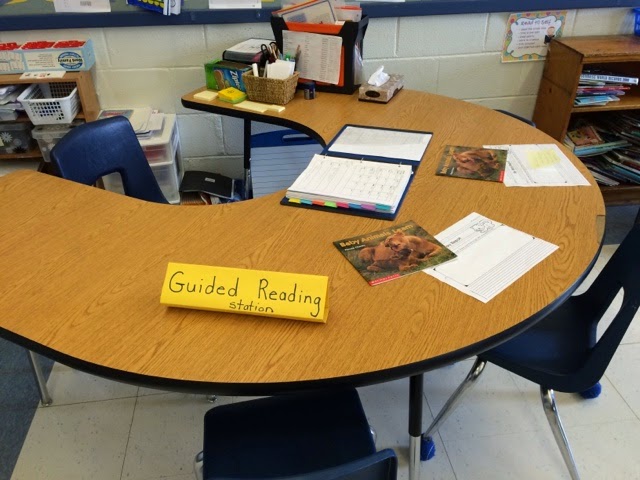
I set my classroom up for language centres and guided
reading. I've been doing this program
since January and have been refining the activities, the groups, and the
procedures as we go along. As I set up
the room for other teachers to tour I realized how much refining and effort I
have put into this and am proud of the results.
Here is what I set up:
As I went into each room, I was impressed by the personality
that was evident, each class has it’s own feel that I think is a mixture of the
personality of the teacher and that of the students in the class. Every classroom had student work on display
as well as resources provided to support students as they learn new
skills.
Here are some guided reading resources that were on display
in Ms. Lebon's grade 1 classroom. Also in this
room were some great word work activities, and calming music that literally set
a tone for learning.
This was on the wall of Mrs. Sowler-Price's classroom, I will definitely borrow this for guiding my writers!
Mr. Quick's math map is a great way to document and consolidate math learning.
Great activities for exploring volume and surface area in Mrs. Normore's class.
As I work out a plan to teach 3D shapes, this is an activity I'll pirate and alter for grade 2.

The grade 3 class is gearing up for EQAO. It's helpful to know what kind of preparation they are doing so that I can use the same kind of questions and language with grade 2 students. Thanks for sharing, Mrs. Hansen!
Found this great resource in the core french room! So great to learn something completely new, can't wait to try it out. Merci, Mlle Campbell.
LOVE this activity! Mrs. McDonald had some great math activities. Perfect timing as we start exploring 3D shapes with grade 2's!
This board shows how students are aware of their own learning style, and by putting it up in the classroom, Miss Waddell has a visual reminder to direct her lessons to all of the various learning styles in the room.
Fantastic display found in the kindergarten classroom! A visual representation of how much sugar is in the food and beverages that our children regularly consume. Mr. Adair also had an Explain Everything video guiding us through his inquiry based teaching strategies.
My last stop was in the tech lab where Ms. Root and Mr. Wain had student projects on display. The intermediates are doing some impressive designing and building. They even have a 3D printer - and printed out a helicopter!
Wow! who know all of this was going on in the other classrooms while I'm busy with mine. So glad I got to take a tour!
Now for the shaping up framework:
Triangle - three important points.
1. I am not alone, there are so many great people and resources in the building.
2. Erin staff are absolutely the best! We had so much fun sharing and being social today.
3. We will never be finished learning. Even the teachers with years of experience are constantly refining and finding new or different ways to approach and engage their learners.
Square - something that "square's" my thinking.
I have tried out the math map in my classroom, and seeing the map on the wall in Mr. Quick's room solidifies my thinking about the power of this tool for guiding students through a math unit.
Circle - something circling around in my head, a question I still have.
Are my walls too busy? Some of the rooms are more minimalist, and I found them calming. perhaps only displaying the current learning and recent student work would make each thing displayed more prominent and calm the room.
Here are some other blog posts around our PD day:
Principal Learning by Peter LeBlanc
roweonthego by Lesley Rowe
Nicole Hamilton's Library of Learning




.JPG)


